
Important information about a company should not be like searching for a needle in a haystack. But for many small businesses and expanding teams, this often leads to confusion and frustration over paperwork spread out in various folders, computers, and email messages. When employees or clients need an answer, it can be hard to find company policies, manuals, contracts, or project guidelines.
For instance, a staff member may end up wasting a few minutes looking for the annual leave policy, whilst a freelancer could open multiple contracts to ensure that a client’s needs are met. Such short breaks can cause a disruption to the day’s work and lower productivity.
An internal knowledge base provides an organized method. It integrates useful information from various documents into a searchable repository where employees can ask questions and retrieve relevant answers.
Introducing iBoomto: Document AI for Windows
iboomto.com is an AI Document solution for Windows to simplify document processing and information management. It can handle both online and local AI models, providing flexibility in choice for processing documents.
Its AI Knowledge Base functionality lets users interact with information gleaned from several documents without having to manually search through them.
Security and privacy are significant factors, especially when it comes to internal company information. iBoomto offers various processing options for various workflows. It is also free, with no token limits, making it an excellent solution for businesses and individuals looking to try out AI documentation without the subscription cost.
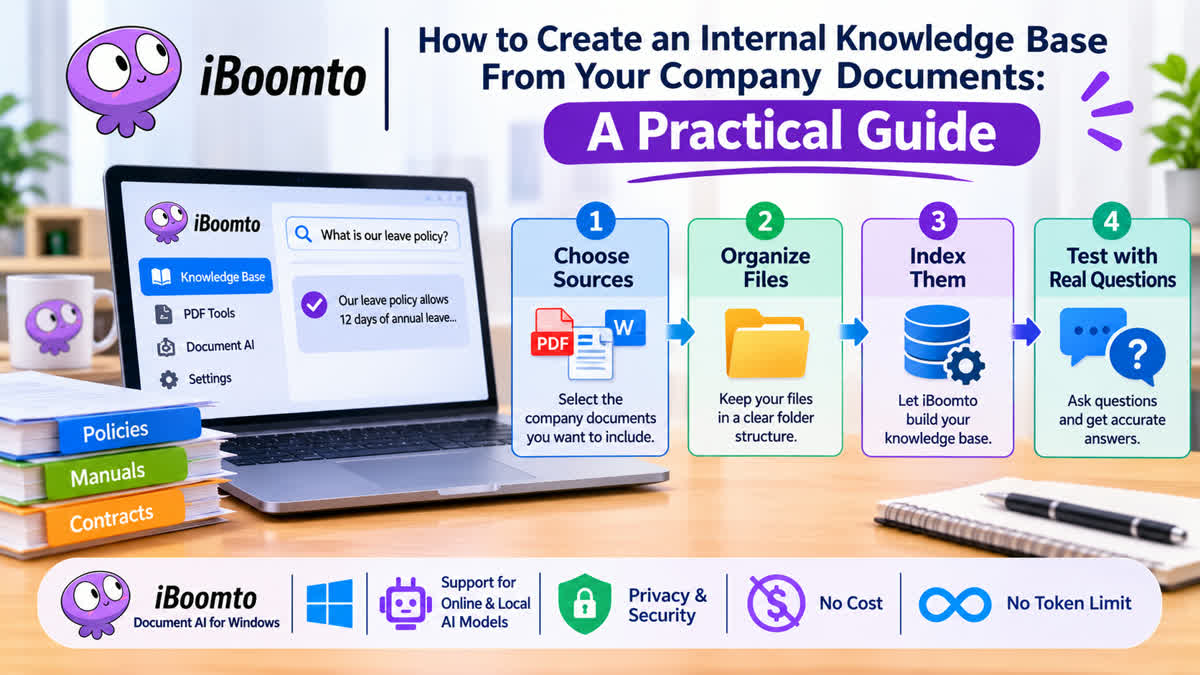
Step 1: Choose the Right Company Documents
Start by identifying which documents your team regularly needs. You do not have to include every file immediately. Begin with a small collection of frequently used material.
For example, a small business could start with:
- Employee policies and leave guidelines.
- Company procedures and internal manuals.
- Client contracts and service agreements.
- Frequently asked questions.
- Product and service documentation.
Select relevant and current documents and do not use documents that are out of date, which may generate conflicting responses.
Step 2: Organize Your Files
Organize your documents into well-defined categories before building the knowledge base. These may be divided into categories like HR policies, customer data, contracts, and operational policies.
Give descriptive names to your files so that they’re easily identifiable. Eliminate redundant versions and find the latest versions.
This preparation simplifies document management and ensures a uniform set of reference material.
Step 3: Build and Index Your Knowledge Base
After having your documents prepared, import the chosen files into iBoomto’s AI Knowledge Base workflow. Add your reference material to the system following the process you have available and enable the system to build it for searching and QA.
When a user types a question, the index assists the AI system in making document information available.
If, for instance, a number of policy documents need to be opened manually, an employee can ask, “What is the company’s annual leave policy?” The knowledge base is able to give a relevant reply, based on the reference material presented.
Step 4: Test It with Real Questions
Please note that it is not enough to add documents to the knowledge base and expect it to be ready to use. Test it with questions that employees and team members might ask.
Try questions such as:
- What is the procedure for requesting leave?
- Which services are included in our standard contract?
- What steps should employees follow when reporting an issue?
- Where can I find the company’s refund policy?
Compare the answers with the original documents. Look for missing information and answers that are based on wrong information.
If the answer is not clear, re-read the source files and reorganize them so they can be read again before testing again.
Keep Your Knowledge Base Updated
The facts about a company are subject to change. As businesses mature, policies change, contracts come to an end, and procedures evolve. When the knowledge base is out of date, it can add to the confusion rather than clarify it.
Keep documents up to date as part of your normal workflow. Update old versions, delete unnecessary files, and audit important information when there are changes in company policies.
Also, keep in mind that an internal knowledge base should adhere to document permissions. Certain contracts and employee records must be available to only authorized users.
Final Thoughts
It doesn’t need to be difficult to create internal knowledge base. Begin with commonly used business documents, group them into logical sections, label them as subcategories, and then try them with real-life questions.
iBoomto offers these features with online and local AI models in a Windows environment. It’s privacy- and security-oriented, offers no cost, and has no token limit in place, so it is worth a look for daily document management.
The greatest advantage for freelance and small teams is that you have an easier access to find information without having to search through numerous files. A well-structured knowledge base transforms any company’s existing documents into a more usable reference for everyday decisions.