A portable power station can make remote working more flexible by providing reliable electricity when traditional outlets are unavailable. Whether you work from a campsite, a vehicle, or a location with an unstable power supply, staying connected requires careful power management. Choosing the right battery capacity, organizing your equipment, and planning for unexpected interruptions can help maintain productivity. These practical tips explain how to create an efficient, dependable remote workspace.
How to Choose the Right Portable Power Station for Remote Working
Calculate the Power Needs of Your Remote Work Devices
Start by identifying every device you need during your workday, including your laptop, monitor, router, and phone. Check each device's power rating in watts and estimate how many hours you will use it. Multiply wattage by operating hours to calculate energy consumption in watt-hours (Wh). Add these figures together to estimate your daily requirements. Include a reasonable allowance for charging losses and unexpected demands to avoid choosing an undersized power station.
Choose Enough Battery Capacity for a Full Workday
Select a portable power station with enough usable battery capacity to support your typical working hours. For example, equipment consuming an average of 100 watts over eight hours requires approximately 800Wh before accounting for conversion losses. Choosing a battery with additional capacity provides flexibility for longer meetings, unexpected assignments, or charging other devices. Check the manufacturer's usable capacity information rather than relying solely on advertised battery size. This helps prevent interruptions during important tasks.
Check Output Ports, Portability, and Charging Options
Examine the available output ports before selecting a portable power station for remote working. USB-C connections can support compatible laptops, while AC outlets accommodate monitors, routers, and other office equipment. Check each port's power rating to ensure compatibility with your devices. Consider the unit's weight, dimensions, and carrying design if you frequently change locations. Multiple charging options, including wall outlets, vehicle connections, and compatible solar panels, provide greater flexibility when working away from conventional electricity sources.
How to Set Up a Reliable Remote Workspace With Portable Power
Connect Your Laptop, Monitor, and Internet Equipment Safely
Connect your essential work equipment using compatible cables and the appropriate output ports. Start with your laptop and internet router, then add a monitor or other accessories as needed. Confirm that the combined power demand remains below the station's rated output capacity. Avoid damaged cables, loose connections, and overloaded extension cords. When available, use compatible USB-C power delivery for efficient laptop charging. Organize cables carefully to reduce tripping hazards and prevent accidental disconnections during work.
Position Your Power Station for Safe and Convenient Use
Place your portable power station on a stable, level surface close enough to your workspace for convenient cable connections. Keep ventilation openings unobstructed and follow the manufacturer's clearance recommendations to prevent overheating. Avoid direct sunlight, moisture, excessive dust, and nearby heat sources. Position the unit where you can easily view its battery display without disturbing your equipment. If working outdoors, choose a sheltered location that protects the power station from changing weather conditions and accidental damage.
Prepare Backup Power for Video Calls and Unexpected Outages
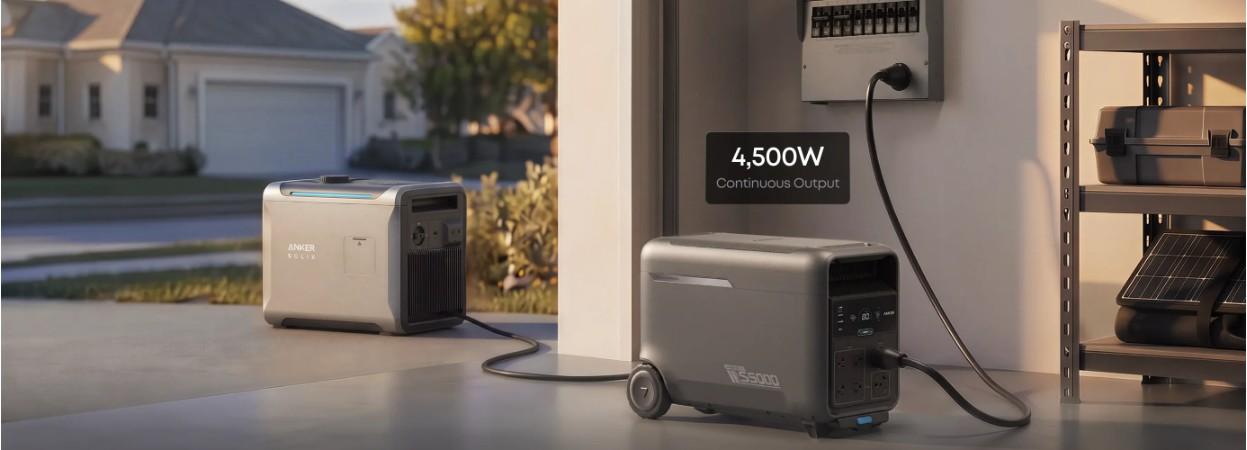
Unexpected outages can interrupt video meetings, disconnect internet equipment, and disrupt important work. Prepare backup power by keeping essential devices connected to an appropriate uninterruptible power supply (UPS) setup. The Anker SOLIX S5000 Portable Power Station offers a 10 ms UPS switchover, providing relevant features for compatible remote work equipment. Verify device compatibility and UPS operating requirements before relying on this function. Test your backup arrangement beforehand, since uninterrupted operation cannot be guaranteed for every connected device.
How to Maximize Portable Power Station Battery Life While Working
Reduce Energy Use With Smart Device and Power Settings
Lowering unnecessary electricity consumption helps extend your portable power station's runtime. Reduce laptop screen brightness, enable energy-saving settings, and close unused applications running in the background. Switch off external monitors and accessories during breaks instead of leaving them operating continuously. Disconnect devices once charging is complete when practical. For longer working sessions, prioritize essential equipment and avoid powering unnecessary appliances. These adjustments reduce battery consumption without significantly affecting productivity or the performance of everyday office tasks.
Recharge Efficiently With Wall Outlets, Car Charging, or Solar Panels
Plan charging opportunities around your work schedule to maintain sufficient battery reserves. Wall outlets generally provide a convenient charging option when grid electricity is available. Vehicle charging can help replenish energy during travel, provided your equipment supports the connection. Compatible solar panels offer another option for outdoor workspaces with adequate sunlight. Use the manufacturer's recommended cables, voltage ranges, and charging accessories. Monitor charging progress and remember that solar output changes with weather, panel positioning, and sunlight intensity.
Monitor Battery Levels and Avoid Overloading Your Power Station
Check your portable power station's battery display periodically to track remaining capacity and estimated runtime. Pay particular attention during video conferences or tasks requiring continuous internet access. Avoid connecting equipment whose combined power requirements exceed the unit's rated output. Some appliances also draw additional electricity when starting, so consider their peak power demands. Establish a minimum battery reserve for essential work devices and recharge before reaching critically low levels. Regular monitoring helps prevent unexpected shutdowns and supports consistent productivity.
Conclusion
A portable power station can support productive remote working when you choose suitable equipment and manage electricity carefully. Calculate your daily energy requirements, select adequate battery capacity, and connect devices safely. Position your power station properly, prepare for unexpected outages, and use energy-saving settings to extend runtime. With reliable charging options and regular battery monitoring, you can maintain a comfortable, efficient workspace across different locations while reducing the risk of power-related interruptions.